Fifteen Placements, One PDF, Zero Signal
A sales manager at an outdoor advertising agency prepares a placement catalog for a media buyer. Fifteen options, one per page - facades, billboards, lightboxes. Each page lists the location, a photo, daily traffic estimates, and the monthly rate. The manager emails the PDF and waits.
Four days pass. The manager calls. "Have you had a chance to review the placements we sent?" The media buyer says the team is still evaluating. The manager has no idea which locations matched the campaign brief, which formats were dismissed in two seconds, and which placement the buyer studied closely enough to picture their client's brand on it.
This is how most outdoor advertising sales work. Send a catalog, wait for a response, hope the buyer volunteers which placements fit their brief. The next move depends entirely on the buyer's willingness to share their preferences - and most media buyers compare catalogs from several agencies before they articulate anything.
There is a better approach: let the catalog tell you what the buyer will not.
How It Can Work: Page 7 Changes Everything
Now imagine the same manager uploads the placement catalog to PaperLink and sends the media buyer a tracked link instead of an email attachment. The catalog looks identical to the buyer - a clean PDF viewer, no login required.
Over the next five days, PaperLink records every interaction:
| Page | Placement | Views | Total time | Pattern |
|---|---|---|---|---|
| 1 | Facade, shopping mall entrance | 1 | 8 sec | Skipped |
| 2 | Billboard 6x3, ring road | 2 | 35 sec | Glanced twice |
| 3 | Lightbox, metro station A | 1 | 5 sec | Skipped |
| 4 | Facade, business center | 1 | 12 sec | Skimmed once |
| 5 | Lightbox, metro station B | 1 | 4 sec | Skipped |
| 6 | Billboard 6x3, highway exit | 3 | 1 min 15 sec | Some interest |
| 7 | Billboard 12x4, main avenue | 7 | 5 min 50 sec | Kept returning |
| 8 | Lightbox, bus stop cluster | 1 | 6 sec | Skipped |
| 9 | Facade, residential complex | 1 | 10 sec | Skipped |
| 10 | Billboard 6x3, airport road | 2 | 40 sec | Glanced |
| 11 | Lightbox, pedestrian underpass | 1 | 3 sec | Skipped |
| 12 | Digital billboard, city center | 3 | 1 min 30 sec | Some interest |
| 13 | Facade, stadium perimeter | 1 | 15 sec | Skimmed once |
| 14 | Billboard 6x3, interchange | 2 | 25 sec | Glanced |
| 15 | Rooftop sign, central square | 2 | 45 sec | Minor interest |
Page 7 - the large-format billboard on the main avenue - was visited seven times across four separate sessions. The buyer spent nearly six minutes studying that single page. They returned to it after reviewing other placements, which means they were comparing locations and kept coming back to the same one.
The buyer never mentioned page 7. They never said "The main avenue billboard fits our campaign." But their behavior said it clearly.
From Data to Action
With this data, the manager walks into the weekly pipeline meeting with the commercial director. Instead of "the buyer is still evaluating," the conversation can go differently:
"The media buyer opened our catalog sixteen times over five days. They looked at all fifteen placements, but they keep coming back to the 12x4 billboard on the main avenue on page 7 - seven visits, nearly six minutes total. All five lightboxes were skipped entirely - under six seconds each. The digital billboard in the city center got some attention too. I think we should prepare a targeted proposal for the main avenue billboard, maybe with a volume discount for a three-month booking."
The commercial director does not need to guess. The data is specific. The recommendation is backed by behavior, not intuition.
Compare this to the alternative: "The buyer said they are evaluating. Should I send them more options?" That conversation goes nowhere because it has no signal.
Create separate tracking links for different media buyers reviewing the same catalog. Each link records engagement independently, so you see which placements match each buyer's campaign brief - without them knowing you can see this.
Why Page-Level Analytics Matter More Than Open Rates
Email tracking tools tell you whether someone opened your email. That is a binary signal - opened or not. It tells you nothing about what happened next.
Page-level document analytics tell you:
- What matches their brief. Seven views on one page out of fifteen is a strong signal. The buyer has a placement preference they have not communicated yet.
- What format they rejected. Five lightboxes skipped in under six seconds each - the buyer's campaign does not need small-format street-level advertising. Do not waste the follow-up call discussing lightboxes.
- How serious the evaluation is. A buyer who opens the catalog once for forty seconds is collecting options. A buyer who returns four times over five days and spends six minutes on one placement is presenting to their client this week.
- When to act. Four sessions in five days means the buyer is in active decision mode. That is your window for a follow-up - not next week, now.
This works because the analytics capture behavior that buyers do not articulate. A media buyer may not tell you that the main avenue billboard fits their campaign perfectly, but they will revisit that page five more times than any other.
Beyond Outdoor Advertising: The Pattern Applies Everywhere
The placement catalog is one example. The same pattern - send a multi-page document, track which pages get attention, act on the signal - works across industries:
Real estate agencies. A catalog with ten apartments. The buyer spends six minutes on the park view unit and skips the suburbs. The agent calls about that specific apartment, not "all our great options." See how page analytics work for real estate.
Event venues. A portfolio with twelve event spaces. The corporate client keeps returning to the rooftop terrace. The venue manager prepares a proposal for that specific space with available dates.
Equipment suppliers. A product catalog with twenty machines. The procurement manager spends four minutes on the industrial printer and skips consumer models. The sales rep calls about enterprise pricing for that printer.
Print shops. A sample portfolio with eight production types. The marketing manager revisits large-format banners three times. The print shop quotes large-format first, not business cards.
The common thread: a multi-page document where each page represents a distinct option, and page engagement reveals preference.
How to Set This Up in PaperLink
The workflow takes less than five minutes:
-
Upload your PDF catalog. Any multi-page document works - placement portfolios, media kits, rate cards, proposal decks. See Upload Documents for the upload flow.
-
Enable email verification. When the buyer enters their email before viewing, every page view is attributed to their identity. You know that it was the media buyer at Brand X - not someone they forwarded the link to - who spent six minutes on page 7.
-
Share the link. Send it via email, WhatsApp, Telegram, or any messaging platform. The buyer clicks the link and views the catalog directly in the browser. No app download, no account required.
-
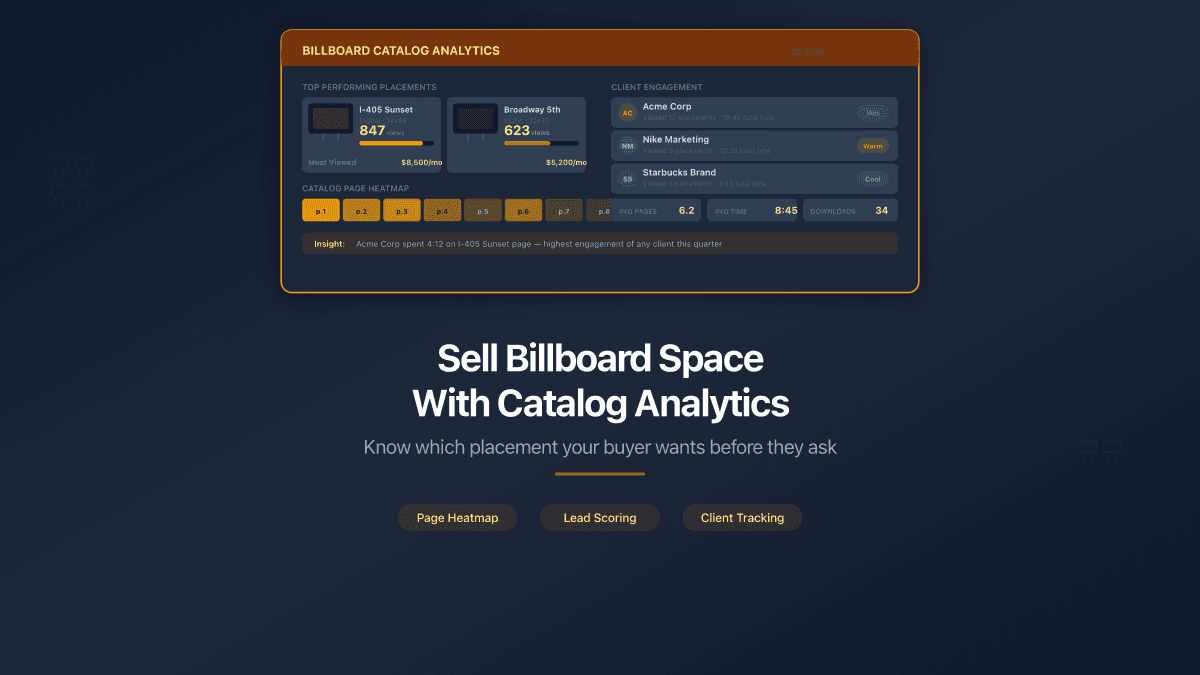
Check the analytics dashboard. PaperLink shows page-by-page engagement for every viewer - time per page, total views, session count, and a heatmap showing which placements attract the most attention.
-
Act on the data. Identify the high-interest placements. Prepare a targeted follow-up that addresses what the buyer actually needs for their campaign, not a generic "any questions about our inventory?" email.
PaperLink records page-level viewing analytics - including time per page, return visits, and session frequency - for every shared document. No cookies or tracking scripts are used on the viewer's side. Analytics are available on the free plan.
The Competitive Edge: Data-Driven Follow-Ups
Research from document analytics platforms shows that proposals sent with engagement tracking achieve roughly 45% response rates, compared to 24% for untracked documents. The difference is not the tracking itself - it is what the sender does with the data.
An informed follow-up converts better than a blind one. "I noticed your team spent time reviewing the main avenue billboard - would you like us to prepare availability and rates for a Q3 booking?" is a different conversation than "Just checking in to see if you had any questions about our placements."
The first message tells the buyer that you understand their campaign needs and respect their timeline. The second tells them nothing.
For advertising sales teams, this is not about surveillance. It is about preparation. You walk into every follow-up knowing which placements match the buyer's brief, which formats they dismissed, and how actively they are evaluating. Your commercial director gets pipeline reports based on behavior data, not guesswork. Deals close faster because the negotiation starts at the point of interest, not at the beginning of the catalog.
Start With Your Next Placement Catalog
Every multi-page document you send is an opportunity to learn what your buyers care about. Placement catalogs. Media kits. Rate cards. Proposal decks.
Upload your PDF, share a tracked link, and let page analytics tell you what your media buyer will not say out loud.
Share your first tracked document. For a complete breakdown of all analytics capabilities, see Track Who Viewed Your Shared Documents. For proposal-specific tracking, see How to Send a Business Proposal That Gets Read. For a similar approach in real estate, see How a Real Estate Agent Can Close a Deal Using Page Analytics.