Most document sharing platforms tell you what happened. Someone viewed your proposal on Tuesday. They spent 4 minutes on it. They looked at 7 of 12 pages.
Useful, but incomplete. The real question is: what does it mean?
PaperLink now answers that question. Two new AI-powered features turn raw sharing analytics into actionable business intelligence - no data science degree required.
AI Insight for Sharing Analytics
Every shared document and folder in PaperLink collects detailed viewer data: page-by-page engagement, time spent per section, return visits, download activity. Until now, interpreting that data was your job.
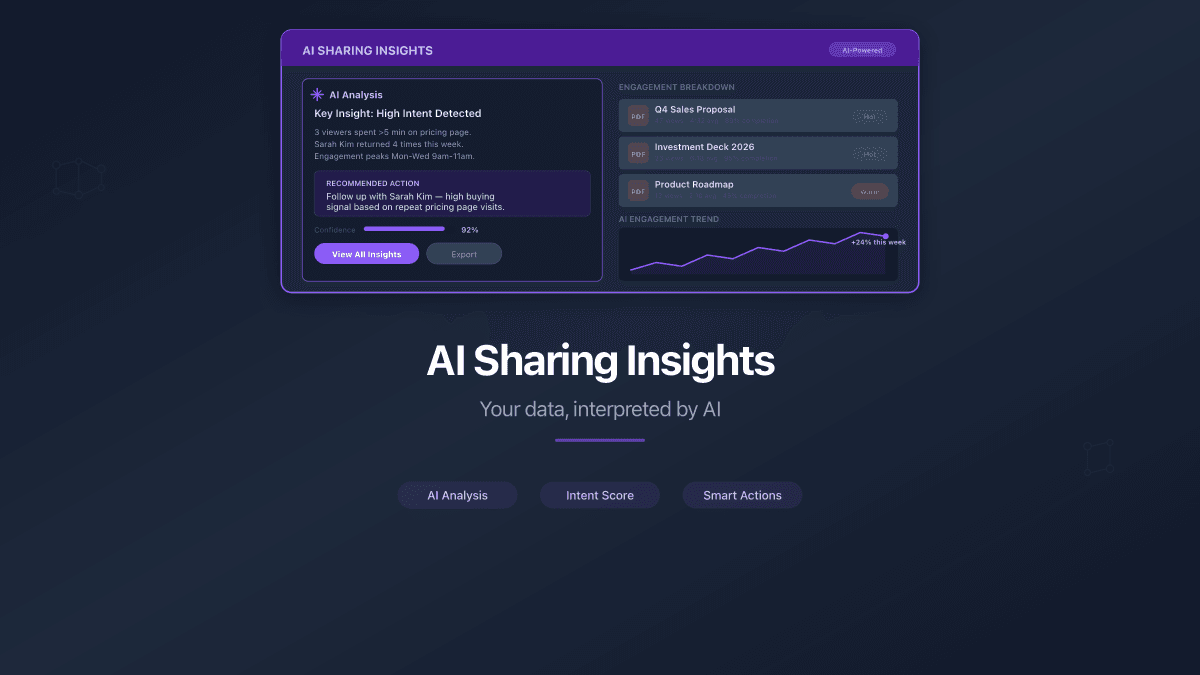
AI Insight changes the equation. One click on "Get AI Insight" and PaperLink's AI analyzes your sharing analytics - then delivers a written summary of what matters.
Here is what the AI evaluates:
- Page engagement tiers - which pages held attention and which got skipped. A 20-page proposal where viewers consistently drop off at page 8 tells you something specific about your content structure.
- Viewer behavior patterns - repeat visits, time-of-day clusters, multi-stakeholder viewing sequences. When three people from the same company view your document within 48 hours, a decision is likely in progress.
- Comparative performance - how a document or folder performs relative to your other shared content. If your Q1 report gets 3x the engagement of Q4, the AI points that out.
The insight appears as a concise, readable summary directly on the document or folder detail page. No charts to decode, no filters to configure - just a clear explanation of what your data reveals.
AI Insight works on both individual documents and entire folders. Folder-level insights aggregate engagement across all documents inside, giving you a portfolio view of how your shared content performs as a collection.
Built for Responsible Use
Each user gets 3 AI Insight requests per day (rolling 24-hour window). This keeps costs predictable while giving you enough capacity to analyze the documents that matter most. The daily limit resets automatically - no subscription tier required.
Every insight includes a disclaimer noting that AI-generated analysis may contain inaccuracies. The raw analytics data remains available alongside the AI summary, so you can always verify the numbers yourself.
AI Business Advisor for New Teams
The second AI feature solves a different problem entirely: the empty workspace.
New users who finish onboarding land on a dashboard with no data, no documents, and no clear next step. Many leave at this point - not because PaperLink lacks the features they need, but because they cannot immediately see which features are relevant to their work.
The AI Business Advisor appears right after onboarding. A modal asks one question: "Tell us about your business." You type a short description - "I run a design studio and send project proposals to clients" or "We lease commercial real estate and share property portfolios with tenants" - and the AI generates a personalized recommendation.
The recommendation is specific to PaperLink's feature set. It might suggest starting with Data Rooms for proposal sharing, setting up client profiles for tracking, or creating invoice templates for recurring billing. The advice adapts to your described workflow, not a generic onboarding checklist.
How It Works
- Complete or skip the onboarding tour
- The AI Advisor modal appears with a text field (up to 500 characters)
- Describe your business activity in any language
- Click "Get recommendation" - the AI responds in your interface language
- Read the personalized guide and dismiss with "Got it"
The recommendation and your business description are saved to your team profile. You can re-run the advisor later from the help menu if your business focus changes or you want updated guidance.
The AI Advisor works per team, not per user. Each team gets its own recommendation based on its own business context. If you manage multiple teams in PaperLink, each one can have a different AI-generated starting guide.
Why AI Interpretation Matters More Than Raw Data
Document tracking is not new. Platforms like DocSend have offered page-level analytics for years. PandaDoc tracks opens and time spent. The data exists across the industry.
What is new - and what most platforms still lack - is AI that interprets the data for you.
Consider the difference:
| Raw Analytics | AI Insight |
|---|---|
| Page 4: 45 seconds avg | "Your pricing page (page 4) receives 3x the average dwell time - viewers are comparing your rates carefully. Consider adding a competitive comparison table." |
| 3 viewers from Acme Corp in 2 days | "Multiple stakeholders at Acme Corp viewed your proposal within 48 hours, suggesting active internal review. This is a strong buying signal - consider following up." |
| Folder: 12 docs, 47 total views | "Your Q1 portfolio outperforms Q4 by 180% in engagement. The top-performing document is your case study - consider leading with it in future pitches." |
Raw numbers require context, pattern recognition, and domain knowledge to be useful. The AI provides all three in seconds.
Who Benefits Most
Sales teams sending proposals and pitch decks. AI Insight tells you which prospects are seriously evaluating your offer based on engagement depth, not just open rates.
Real estate professionals sharing property portfolios and lease agreements. Page-level engagement reveals which properties attract the most interest before a single phone call.
Freelancers and agencies delivering project proposals. The AI identifies which sections of your proposals consistently lose reader attention - so you can restructure before the next pitch.
Legal and compliance teams distributing regulatory documents. Folder-level insights confirm whether recipients actually reviewed required materials, with AI flagging incomplete engagement.
Getting Started
Both features are available now for all PaperLink teams.
AI Insight: Open any shared document or folder with viewing data. Click "Get AI Insight" at the top of the detail page. Your analysis appears in seconds.
AI Business Advisor: Create a new team or re-run the advisor from the help menu (the floating help button in the bottom corner). Describe your business and receive a personalized feature guide.
No configuration needed. No additional cost. The AI runs on Claude by Anthropic, the same model architecture trusted by enterprises for document analysis and business intelligence.