You check Chase and see $340 in dining. You check Amex and see $210 in groceries. You check your debit card and see $85 in gas. Three apps, three partial pictures, zero clarity on what you actually spent this month.
This is the multi-card problem. Most people carry two to four cards - a checking account debit card, a credit card for rewards, maybe a savings account, maybe a second credit card for specific categories. Each bank app tracks its own transactions perfectly. None of them talk to each other.
The result: you know your balances but not your budget.
Why Bank Apps Cannot Solve This
Bank apps show one account. That is their job - they are account management tools, not budget tools.
Chase does not know about your Amex spending. Amex does not know about the $200 you withdrew from an ATM last Tuesday. Your savings account app does not know you moved $500 from checking to cover rent. And none of them track cash - the $40 you spent at the farmers market or the $20 you handed to a friend for lunch.
The deeper problem is transfers. When you move $1,000 from checking to savings, Chase shows a $1,000 "expense." Your savings app shows $1,000 income. Neither is real spending - it is the same money changing pockets. But if you tried to add up totals across apps, that transfer inflates your numbers by $2,000.
Transfers between your own accounts are not expenses. Any tracking system that treats them as expenses will overstate your spending by 20-40%, depending on how often you move money between accounts.
The Spreadsheet Approach (and Why It Fades)
The first instinct is a spreadsheet. One Google Sheet, columns for date, amount, category, which card. You can see everything in one place.
Week one works great. You enter transactions at the end of each day. The totals make sense. You feel in control.
Week three, you skip a day. Then two days. By week five, you are reconstructing transactions from three bank apps, trying to remember what the $47.23 at "SQ* CORNER CAFE" was - lunch with a client or a personal meal. The spreadsheet is now a chore, not a tool.
The core issue is friction. Opening a spreadsheet, finding the right cell, typing date-amount-category-account for every single transaction - it is too many steps. On a phone, it is worse. Tiny cells, no autocomplete, no category dropdowns.
Spreadsheets give you full control. They also require full effort. For tracking across multiple cards, the effort usually wins.
One Tool, All Your Accounts
The alternative is a dedicated tracker that handles multiple accounts natively. Not as a workaround - as a core feature.
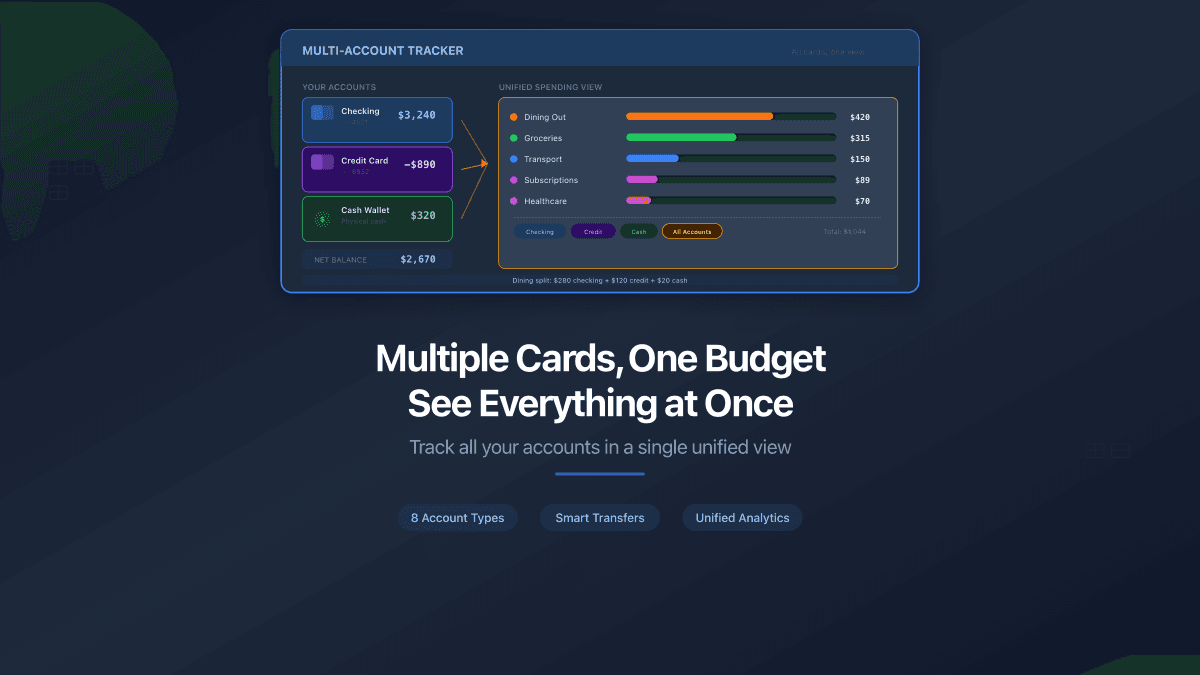
PaperLink lets you create separate accounts for each card and cash wallet, then see all transactions in a single view with unified analytics.
How to set it up (takes about two minutes):
- Create an account for each card - "Chase Checking," "Amex Rewards," "Savings"
- Add a "Cash" account for bills and coins
- Optionally add accounts for e-wallets (Venmo, PayPal), crypto, or investments
- Start logging transactions to the correct account
Every transaction goes to one account. When you look at analytics, you see spending across all of them - total dining out from all cards combined, total groceries regardless of which card you swiped.
Transfers Done Right
The feature that matters most for multi-card users is transfer tracking.
When you withdraw $200 from an ATM, that is not an expense. It is a transfer from your bank account to your cash wallet. Log it as a transfer in PaperLink - your bank account goes down by $200, your cash account goes up by $200. Total net worth unchanged. Total expenses unchanged.
When you pay your credit card bill from checking, same thing. Transfer, not expense. Your checking balance drops, your credit card balance rises. No phantom spending.
When you actually spend the cash - buying coffee, paying for parking - log those as expenses from the Cash account. Now your numbers reflect reality: the moment money left your control, not the moment it changed pockets.
Set up your accounts to match your real financial life. If you carry two cards daily, create two card accounts. If you keep an emergency fund separate, create an account for it. The goal is a mirror of reality, not a simplified version.
Eight Account Types for Every Situation
Different money lives in different places. PaperLink supports eight account types to cover the full picture:
- Bank - checking and savings accounts at any bank
- Cash - physical bills and coins
- E-wallet - Venmo, PayPal, Apple Pay balance, Google Pay
- Credit Card - tracks balance as a liability (money you owe)
- Crypto - Bitcoin, Ethereum, stablecoins
- Investment - brokerage accounts, retirement funds
- Loan - mortgages, car loans, student debt
- Other - gift cards, store credit, anything that does not fit above
Each type behaves correctly. Credit card balances show as negative (owed money). Investment accounts can hold different currencies. Cash does not require bank credentials - because it is cash.
What Changes When You See the Full Picture
Fragmented tracking hides patterns. Consolidated tracking reveals them.
When dining expenses from three cards combine into one number, you see $680 instead of $230 + $310 + $140. That single number hits differently. It is the difference between "I eat out sometimes" and "I spend $680 a month on restaurants."
Category analytics across all accounts also expose habits you cannot see in any single app. Maybe 60% of your entertainment spending happens on one card but 40% on another. Maybe your grocery spending shifts between cards depending on which store you visit. These patterns only appear when every account feeds into the same analysis.
FAQ
Do I need to enter every transaction manually?
Yes - there is no automatic bank sync. PaperLink uses autocomplete that learns your patterns. After a few entries, recurring transactions (morning coffee, weekly groceries, monthly subscriptions) need two taps and a confirmation. Most people spend under a minute per day on entry.
Can I track spending in different currencies?
Yes. Each account can have its own currency. If you have a USD checking account and a EUR travel card, both work in the same workspace with exchange rate tracking.
What if I have more than four cards?
Create as many accounts as you need. There is no limit on the number of accounts in your workspace.
Is this free?
Free to start with a generous limit for personal use. Paid plans available when you need more volume.
The Two-Minute Setup
Add all your cards to PaperLink in two minutes - create an account for each card, add a cash wallet, and start seeing your full financial picture in one place. Try it free.
There is no single best tool for budgeting - but there is a right setup for your situation. If you use multiple cards, the setup that works is the one that combines them. For a deeper look at budgeting methods, read our complete guide to budgeting. For an honest comparison of tracking tools, see spreadsheets vs apps vs bank tools.
PaperLink is also a document sharing platform. Send proposals, invoices, and presentations with built-in analytics - see who viewed your documents, which pages held their attention, and how long they spent reading. Explore document sharing analytics.