Most document sharing tools are designed to be used through a browser. You log in, upload, share, track. That works well until you need to connect PaperLink to something else - your CRM, your inventory system, a custom internal tool, or a script that runs at 3am without anyone clicking anything.
Today that connection exists. PaperLink has a public REST API.
What This Makes Possible
The API gives your team programmatic access to PaperLink data. If you have a developer, a technical co-founder, or access to AI coding tools, you can now build integrations that were previously impossible without manual exports.
Sync your product catalog from an external system. Pull data into your own dashboard. Trigger workflows when things change. The specific use cases depend on your business - the API is the foundation that makes them buildable.
The API is available on all plans. No separate developer tier required.
Built for Real Integration Work
The API is versioned at /api/v1/ from day one. Version pinning means integrations you build today keep working when PaperLink adds new endpoints - you opt into changes rather than getting them forced on you.
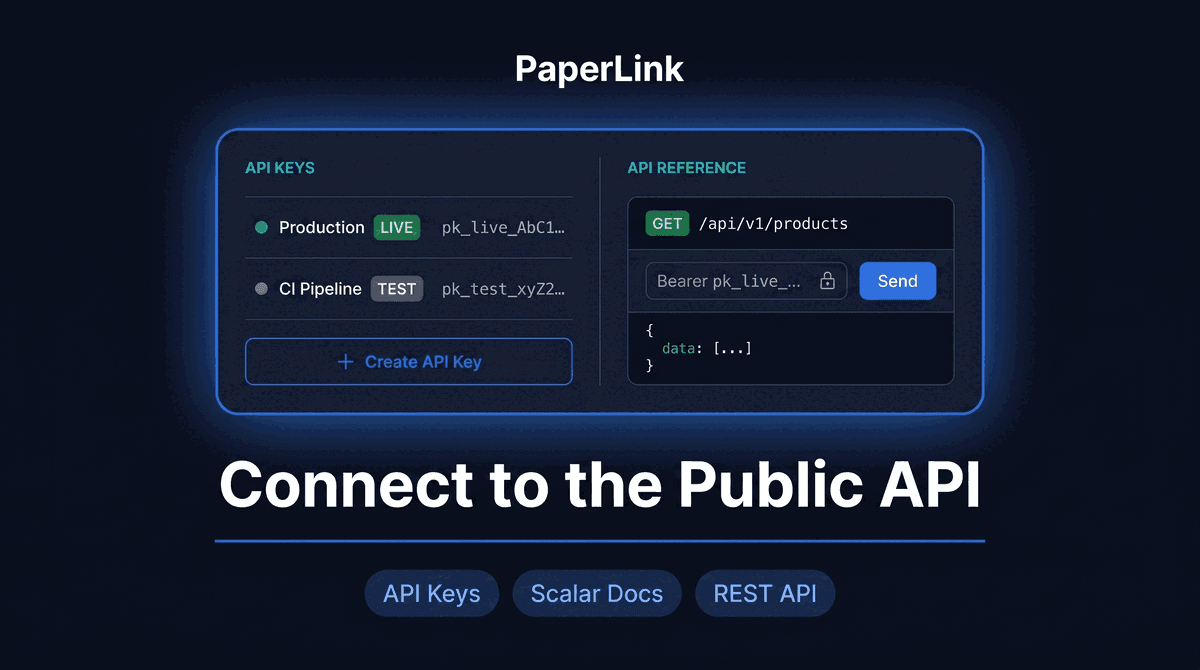
Authentication uses API keys with two modes:
Live mode (pk_live_...) - operates on your real production data. Use this for active integrations.
Test mode (pk_test_...) - operates on an isolated sandbox. Test mode data is completely separate from live data. A test key cannot read or modify live records, and vice versa. This matters when you are building an integration and want to run it repeatedly against realistic data without touching anything production.
Both modes support two permission scopes: Read & Write for full access, and Read-only for tools that only need to retrieve data - reporting dashboards, analytics pipelines, or any integration where write access would be a liability.
One Token, Shown Once
When you create an API key, PaperLink shows you the full token exactly once. Copy it, store it securely, and that is the last time you will see it. PaperLink stores only a hash - not the token itself.
This is the same pattern Stripe and Linear use. If a key is compromised, revoke it from Settings and create a new one. Revocation takes effect within seconds.
Each key shows when it was last used, who created it, and its mode and scope. You can rename keys to keep track of which integration uses which credential.
The Documentation Is Interactive
The full Developer Portal lives at developers.paperlink.online. It includes the complete API reference with all endpoints, request and response schemas, and an interactive playground where you can make real requests directly from the browser using your own API key.
The OpenAPI specification is publicly available at /api/v1/openapi.json. Use it to generate a typed client in whatever language your team uses.
Rate Limits and Error Responses
The API enforces rate limits per key, not per IP. Each key gets its own independent quota, so different integrations on the same team do not affect each other.
Every error response follows the same structure: a type field (authentication error, validation error, rate limit error, and so on), a machine-readable code, a human-readable message, and a request_id you can quote when contacting support. Error types are designed so you can branch your error handling by type - retryable errors look different from auth failures.
POST and PATCH requests support idempotency keys. Send the same Idempotency-Key header on a retry and PaperLink returns the original response instead of creating a duplicate. Standard practice for any integration that runs over unreliable networks or in CI pipelines where the same job might execute twice.
Who Should Use This
The API is designed for two different people.
Developers and technical founders building integrations directly. If you have a CRM, an inventory tool, or a custom system and you want PaperLink data to flow between them, this is the direct path. The Developer Portal gives you everything you need to get from zero to a working integration in under an hour.
Teams using no-code automation platforms like Zapier or Make. Those platforms can connect to any REST API with Bearer token authentication. PaperLink's consistent error format and versioned endpoints make it stable enough to build production Zaps on top of.
Getting Started
Go to Settings - Integrations - Public API in your PaperLink workspace. Create your first API key, copy the token, and open the API reference. The docs page has a curl example ready to run.
The help article for API key setup walks through every step.