Sharing sensitive documents with clients, investors, or partners raises a reasonable question: how exactly are those files protected?
This article explains the actual security architecture behind PaperLink, with links to every provider's public certification page. No marketing language - just how it works.
Four Certified Infrastructure Providers
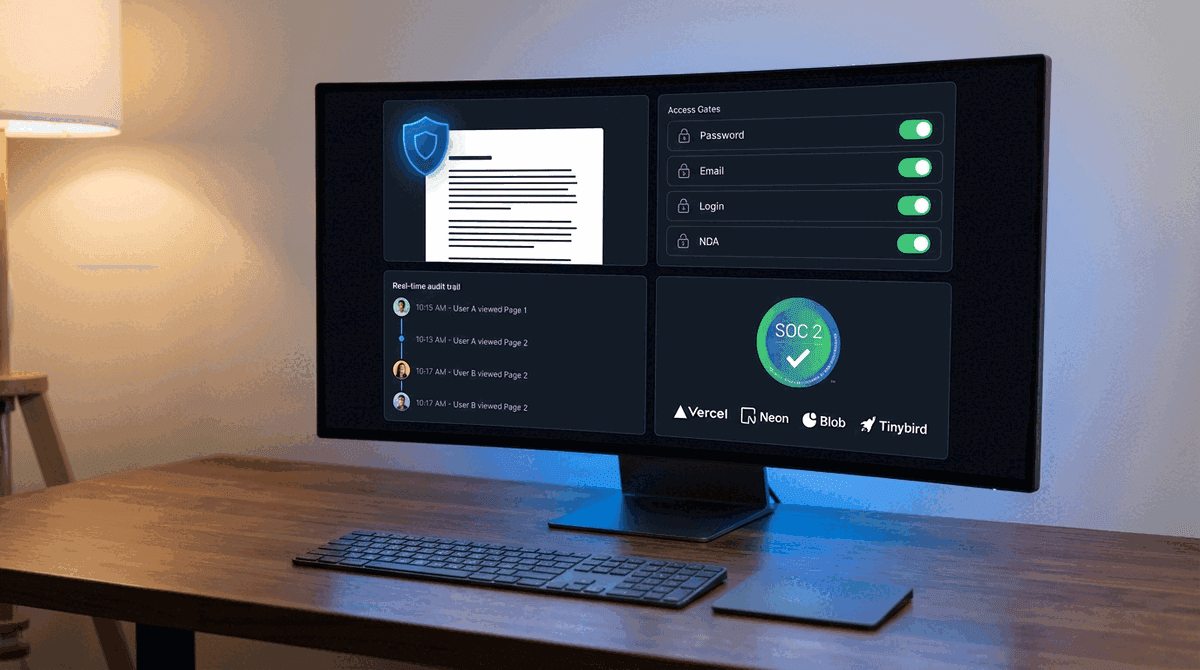
PaperLink does not run its own servers. The application, database, file storage, and analytics each run on a separate provider. Each provider maintains independent security certifications audited by third parties.
| Provider | Role | Key Certifications |
|---|---|---|
| Vercel | Application hosting | SOC 2 Type 2, ISO 27001:2022, PCI DSS |
| Neon | PostgreSQL database | SOC 2 Type 2, ISO 27001, ISO 27701, GDPR, CCPA |
| Vercel Blob | File storage | AES-256 encryption at rest |
| Tinybird | View analytics | SOC 2 Type 2, HIPAA |
All four providers hold SOC 2 Type 2 certification - meaning their security controls are audited continuously, not just at a point in time.
Encryption at Every Layer
| What | Method | Who manages the keys |
|---|---|---|
| Files stored on disk | AES-256 (Vercel Blob) | Vercel (automatic key management) |
| Database records | AES-256 (Neon) | AWS KMS with automatic rotation |
| Analytics data | Encrypted at rest (Tinybird) | Unique keys per service |
| All network traffic | TLS/HTTPS (Vercel) | Auto-generated SSL certificates |
| Database connections | TLS 1.2/1.3 (Neon) | Neon enforced |
| Link passwords | Bcrypt hash (OWASP standard) | Irreversible - not even PaperLink can read them |
Your files are encrypted before they touch the disk. Your data is encrypted in the database. Everything moves over HTTPS. There is no point in the chain where data sits unencrypted.
How Document Access Works
External recipients never access files directly. Every view goes through a sharing link with configurable access gates.
Sharing Link Anatomy
Each sharing link has a unique identifier with 2^122 possible combinations. For context, there are roughly 10^80 atoms in the observable universe. Guessing a link identifier by brute force is not a realistic attack vector.
Links support automatic expiration. Once a link expires, it returns an error without revealing any information about the document. The document owner can also deactivate a link instantly from the dashboard.
Access Gates
Each link can require any combination of four gates. The document loads only after every active gate is passed:
- Password - recipient must enter a password. Stored as a bcrypt cryptographic hash - irreversible, industry standard
- Login Required - recipient must have a PaperLink account and be logged in
- Email Required - recipient must provide their email address before viewing
- Agreement/NDA - recipient must read and sign a legal agreement before viewing
Gates are stackable. A law firm sharing a due diligence document might enable password + NDA. A sales team sharing a proposal might use email only. The document owner decides per link.
For sensitive documents, use at minimum Password + Expiration. Send the password through a separate channel - phone call, SMS, or a different messenger than the link itself.
Audit Trail for Every View
PaperLink records every document view in a separate analytics system (Tinybird, SOC 2 Type 2 certified). The document owner sees:
- Who viewed the document (email, if email gate is enabled)
- When the view happened (timestamp)
- Which pages were viewed and how long the recipient spent on each page
- The viewer's IP address, device, browser, and geographic location
This data is available in real time. If a recipient opens a shared contract at 2:47 AM from an unexpected country, the document owner sees it immediately.
Team Data Isolation
PaperLink is a multi-tenant platform - multiple organizations use the same application. Data isolation between teams is enforced at the database level.
Every database query includes the team identifier. Team A's queries physically cannot return Team B's records. This is not a UI filter that could be bypassed - it is a database-level constraint.
The team identifier comes from the server-side session token, not from the client request. A modified client cannot impersonate another team because the team identifier is cryptographically bound to the authenticated session.
File Upload Protection
Every file upload passes through five checks:
- The user must be authenticated (valid session)
- The user must be a member of the target team
- Only PDF files are accepted (MIME type whitelist)
- The file size is limited based on the team's subscription plan
- The upload token is generated server-side through Vercel's secure handshake
An unauthenticated request, a non-PDF file, or an oversized file is rejected before it reaches storage.
Automated Security Testing
PaperLink runs 53 security and architecture tests on every code change. No code reaches production without passing all of them.
These tests cover:
- Team isolation - verifying that every database query is scoped to the correct team, across every feature (documents, sharing, accounting, team management)
- Architectural boundaries - static analysis that rejects code where database logic appears in the user interface layer or business rules leak into the wrong component
- Upload restrictions - a test that reads the actual upload route and verifies the file type whitelist
- Configuration safety - tests that verify no credentials are committed to the code repository and security headers are configured correctly
These are not optional checks. They run automatically before every deployment and block production releases if any test fails.
What PaperLink Protects Against
| Attack | Protection |
|---|---|
| Guessing a sharing link | UUID identifier (2^122 combinations - mathematically infeasible) |
| Accessing a document without authorization | Multi-gate access control (password, login, email, NDA) |
| Viewing an expired document | Server-side expiration check before any data is returned |
| Reading data from another team | Database-level team isolation in every query |
| Intercepting data in transit | TLS/HTTPS on all connections (Vercel enforced) |
| Accessing data on disk | AES-256 encryption at rest (Vercel Blob, Neon) |
| SQL injection | Parameterized ORM queries (no raw SQL) |
| Cross-site scripting (XSS) | Automatic output escaping (React framework) |
| Uploading malicious files | PDF-only whitelist with server-side validation |
| Credential leaks in code | Automated test blocks commits with exposed secrets |
What Falls Outside Platform Control
No document sharing platform can prevent a trusted recipient from forwarding a link, sharing a password, or photographing the screen. These are organizational risks, not platform vulnerabilities.
PaperLink provides tools that help organizations manage these risks - password gates, NDA requirements, view analytics that create accountability, and link expiration that limits the window of exposure. But the decision to use these tools, and the training of staff to handle sensitive documents properly, belongs to the organization.
PaperLink's full security documentation, including infrastructure certification links and technical details, is available on request. Contact info@paperlink.online.
Start Sharing Documents Securely
PaperLink combines page-level view analytics with multi-gate access control - so you know exactly who reads your documents and can control how they access them.
Create a free account and share your first document with full tracking in under two minutes.