Sending a resume into a job application portal is a one-way action. You attach the file, hit submit, and wait. No confirmation it was opened. No signal of whether anyone spent time on it. Just silence until a recruiter decides to respond - or doesn't.
Sharing your resume as a link changes that dynamic entirely.
What a Shareable Resume Link Actually Gives You
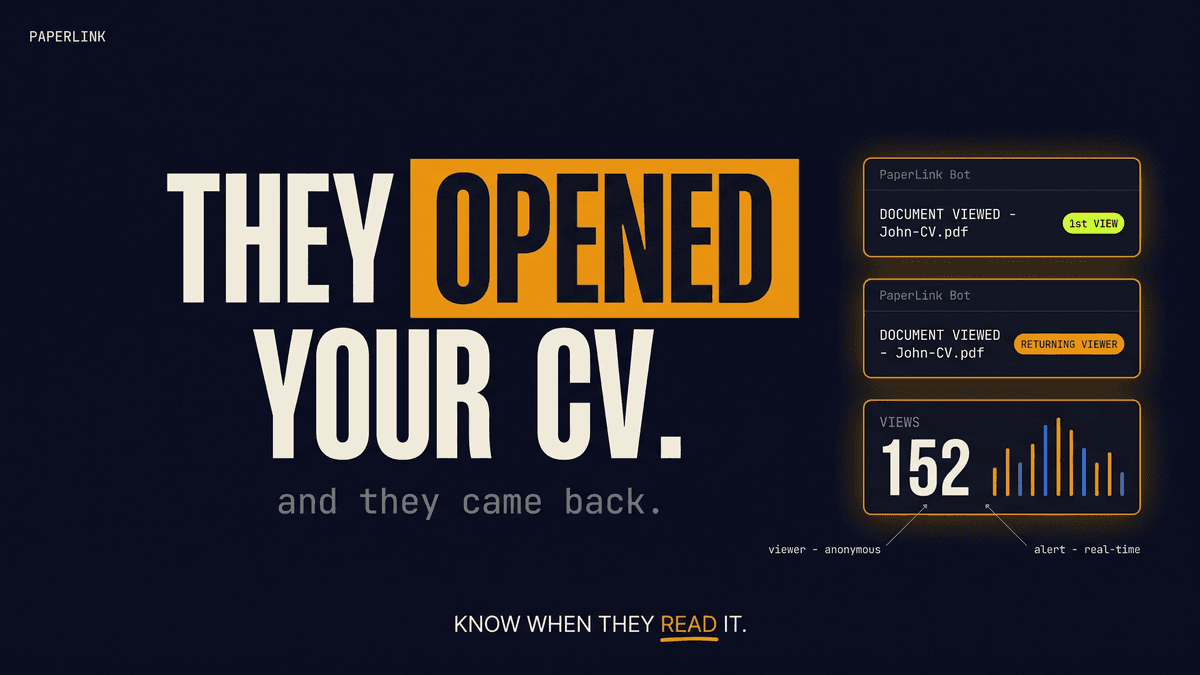
When you upload your CV to PaperLink and share it as a link, the document stays on PaperLink's servers. The link you send goes to the recruiter. The moment they open it, you get notified.
The notification arrives in Telegram and includes:
- Which document was opened ("John-CV.pdf")
- The viewer type ("Anonymous viewer" if they didn't identify themselves)
- Whether this is their first view or a return visit
That last detail - Returning viewer - is the one that matters most for job searching.
Why "Returning Viewer" Is the Signal You've Been Missing
A first open is ambiguous. Recruiters screen dozens of resumes a day. Someone opening your CV for 20 seconds tells you very little.
A returning viewer tells you something specific: this person came back. They saw enough on the first pass to want a second look. In a job search context, that usually means one of two things - they're shortlisting you, or they're comparing you against another candidate.
If you get a "Returning viewer" notification, follow up within 24 hours. The recruiter has your CV actively in mind.
This is the same signal sales teams use when tracking proposals. A prospect who views your pricing document three times is further along the decision process than one who glanced at it once. The logic applies equally to candidates.
How to Set This Up
The setup takes about two minutes.
- Sign in to PaperLink and create a free account
- Upload your resume PDF to a new Data Room or directly as a shared file
- Copy the shareable link PaperLink generates
- Connect your Telegram account in notification settings
- Send the link instead of attaching the PDF
From that point, every view triggers a notification. You can create different links for different job applications - one for the agency recruiter, one for the direct application, one for the contact you found on LinkedIn. Each link tracks independently, so you see which channel is actually getting attention.
PaperLink generates a unique shareable link for any PDF. You can share the same document via multiple links and track each one separately - useful for A/B testing different application channels.
The Practical Advantage in Job Searching
Most candidates treat a submitted application as submitted and forgotten. They apply to 30 positions, send the same PDF everywhere, and wait for the phone to ring.
Knowing which applications got opened - and which got a second look - lets you prioritize your follow-up intelligently. If you applied to five companies last week and only two opened your CV, those two are worth a direct message. The other three may not have seen it yet, or the role may already be filled.
The returning viewer notification takes this further. It surfaces the companies where someone is actively considering you, before they've made a decision. That timing window - between their interest and their decision - is where a well-placed follow-up can make a difference.
What You Can't Control (And Shouldn't Try To)
Not every recruiter will click your shared link. Many ATS systems require PDF attachment uploads rather than link submissions. For those applications, this approach doesn't apply.
Where it works is in direct outreach: sending your CV to a recruiter via email, sharing it via LinkedIn message, or posting it on a personal site. Any situation where you control how the document reaches the reader.
Some companies have policies against clicking external links in job applications. If applying through an official portal, use the PDF attachment as required. Keep the shareable link for direct outreach.
The Broader Pattern
Document tracking is not new. Sales professionals have used tools like DocSend to monitor proposal engagement for years. The underlying need - knowing whether your document was actually read - is universal.
Job searching is a sales process. You are selling your candidacy. The recruiter is evaluating whether to invest time in you. Using the same information advantages that sales teams take for granted in B2B deals makes the same sense in a job search context.
PaperLink was built for business document sharing: proposals, data rooms, financial documents. But the mechanics are identical. Any PDF you send as a link gives you real-time visibility into who reads it, when, and whether they came back.
Share your resume with view tracking - sign up for PaperLink