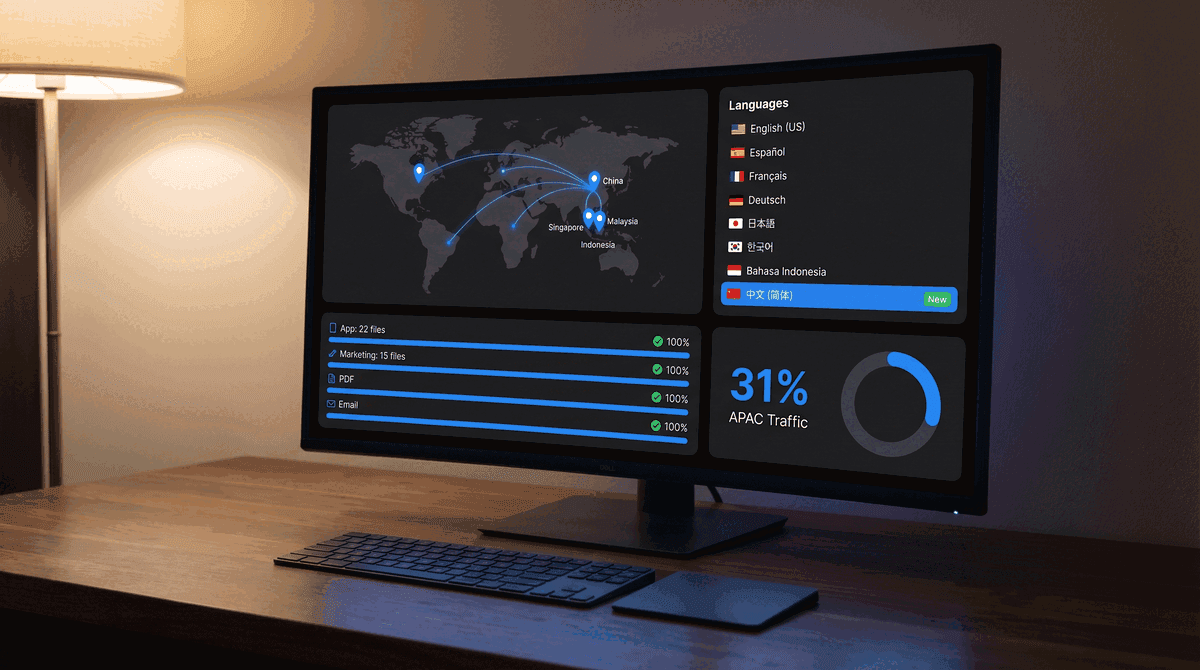
PaperLink now supports Simplified Chinese across the entire product - app interface, marketing site, and PDF output. This makes Chinese the 8th language available, alongside English, Ukrainian, Spanish, German, French, Greek, and Arabic.
Why Chinese, Why Now
Over a third of PaperLink's traffic comes from the Asia-Pacific region. Singapore alone accounts for 16% of visitors, and China adds another 15%. For users in these markets, navigating a document sharing platform in a second language creates friction at the exact moment trust matters most - when a client opens a shared proposal or reviews a contract.
Singapore's business environment operates in four official languages, but Mandarin Chinese is the working language for roughly 75% of the population. Until now, these users had to work in English or leave. Adding Chinese removes that barrier.
What's Translated
Every user-facing string in PaperLink is now available in Simplified Chinese (zh-Hans):
- App interface - 22 dictionary files covering dashboard, invoices, estimates, documents, client management, settings, billing, and more
- Marketing site - 15 dictionary files including landing pages, pricing, features, legal pages, and help center navigation
- PDF documents - Invoice and estimate PDFs render with Chinese labels and formatting
- Email notifications - Document sharing emails display in Chinese when the sender's locale is set to zh-Hans
The translation uses formal Chinese (您, not 你) throughout, matching the professional tone expected in B2B software.
How It Works
PaperLink detects the user's language preference in three ways:
- Browser language - if your browser sends
zh,zh-CN,zh-Hans, orzh-SG, PaperLink automatically serves the Chinese interface - Manual selection - click 中文 in the language selector (available in both the app and marketing site)
- URL - navigate directly to
paperlink.online/zh-Hans/to access any page in Chinese
Your preference is saved in a cookie, so subsequent visits remember your language choice.
Font Rendering
Chinese characters require dedicated font support. PaperLink loads Noto Sans SC (Google Fonts) specifically for Chinese-locale users. The font is loaded on demand - users browsing in other languages see zero performance impact. System fonts (PingFang SC on macOS, Microsoft YaHei on Windows) serve as fallbacks if the web font fails to load.
Chinese text is typically 30-50% shorter than equivalent English text. You may notice extra whitespace in some UI elements - this is expected and does not affect functionality.
Supported Markets
The zh-Hans locale uses Simplified Chinese characters, which are standard in:
| Region | Primary use |
|---|---|
| Mainland China | Official standard |
| Singapore | Business and education |
| Malaysia | Chinese-speaking communities |
| Indonesia | Chinese-speaking business community |
PaperLink's geo-detection maps visitors from China, Hong Kong, and Macau to the zh-Hans locale by default. Traditional Chinese (zh-Hant) for Taiwan and Hong Kong is planned for a future release.
What This Means for Your Documents
When you share a document link with a recipient, PaperLink serves the viewing experience in the sender's configured language. If you work in Chinese, your recipients see Chinese UI elements around the shared document - the toolbar, password prompts, download buttons, and agreement gates all appear in Chinese.
The document content itself is unchanged. PaperLink displays your PDF exactly as uploaded, regardless of language settings.
Languages Available in PaperLink
| Language | Code | Status |
|---|---|---|
| English | en | Available |
| Ukrainian | uk | Available |
| Spanish | es | Available |
| German | de | Available |
| French | fr | Available |
| Greek | el | Available |
| Arabic | ar | Available |
| Chinese (Simplified) | zh-Hans | New |
Get Started
If your browser language is set to Chinese, PaperLink will automatically switch. Otherwise, open the language selector in Settings or on the marketing site and choose 中文.